
Balances
Every member with their live balance and aging, plus club-wide totals. Flip the Outstanding filter and the list collapses to only the members who owe — and the aging exports to Excel or CSV.
Because the register, the tee sheet and the billing office run on one database, every line on a member’s statement traces back to the ticket that created it. Balances are live, aging is automatic, and the monthly run is a checklist — not a week.
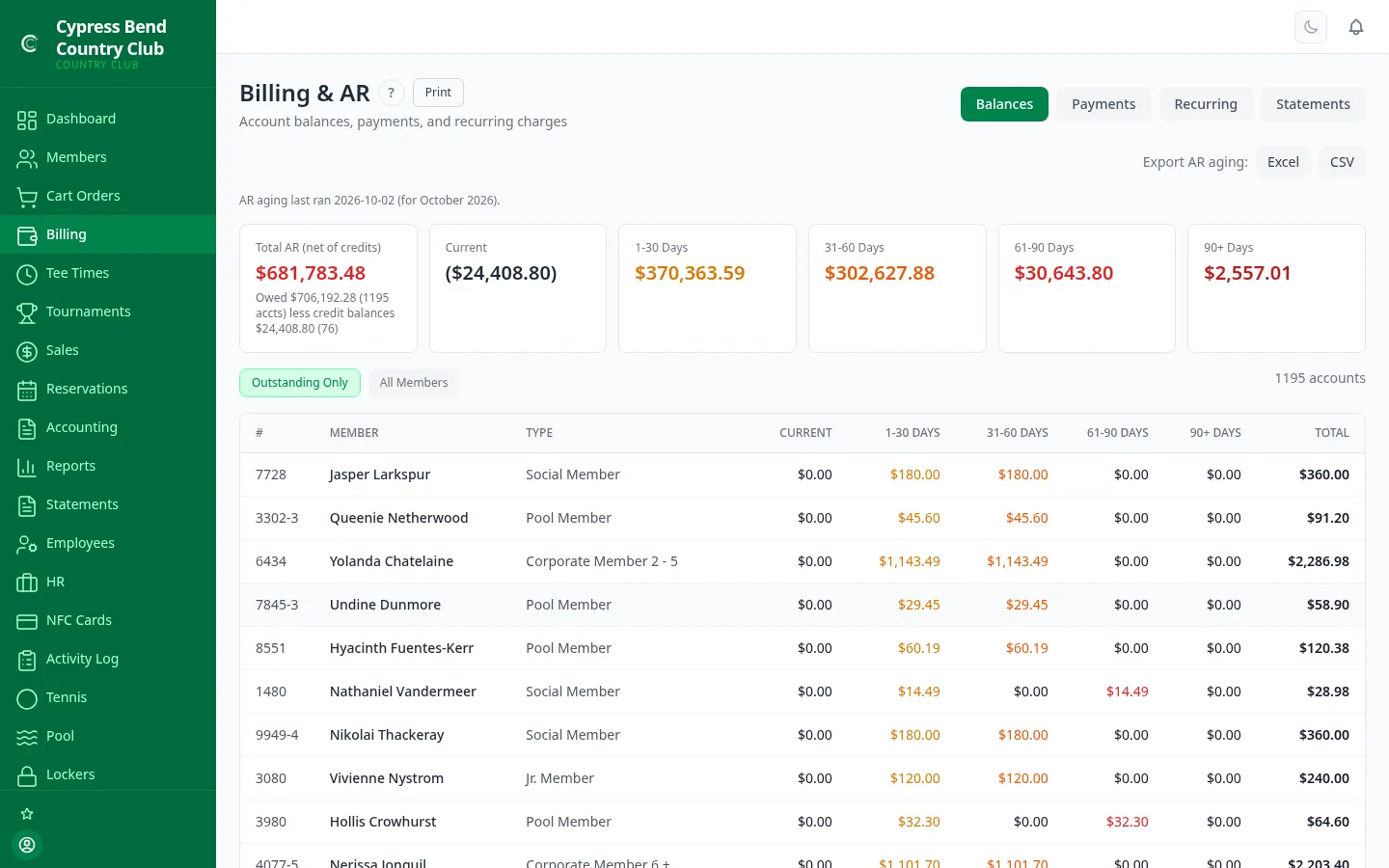
There’s no nightly export between the point of sale and the billing office — a member charge at the bar, in the pro shop or from a cart on the 7th posts straight to the account it belongs to. When a member disputes a line, you open the ticket behind it.
Every member with their live balance and aging, plus club-wide totals. Flip the Outstanding filter and the list collapses to only the members who owe — and the aging exports to Excel or CSV.
Post cash, check, card or ACH against an account in a few clicks — the payment clears the oldest aging bucket first, and any overpayment stays on the account as a credit. Manual adjustments and credits post the same way, with a paper trail.
Dues, cart plans, locker fees — defined once with an amount, a frequency and optionally a member type, then posted automatically on the 1st of every month. Each type’s dues bill through exactly one charge, so dues can’t bill twice.
Pick the period, generate every member’s statement, deliver by email — and track each one individually instead of hitting send and hoping.
Balances roll through Current, 1–30, 31–60, 61–90 and 90+ day buckets automatically on the monthly cycle — labelled exactly like the A/R aging export, with Total A/R net of credit balances — and members see the same buckets in the portal. The Aged A/R report breaks receivables down member by member, with each member’s transaction history a click away — and statements still reach resigned, suspended and on-leave members who owe.
Generate, deliver, retry, print — four steps, each one verified before you move to the next.
One click builds the statement for every member in the billing period.
Statements go out by email — rehearse first with a dry run to a test address — and every member’s delivery is tracked individually: Sent, Failed, No Email, Paper Only or Pending.
Resend just the failed and pending rows — not the whole run. Nobody gets their statement twice.
Members without an email address, or flagged for paper, come out as a single print batch PDF, ready for the mail.
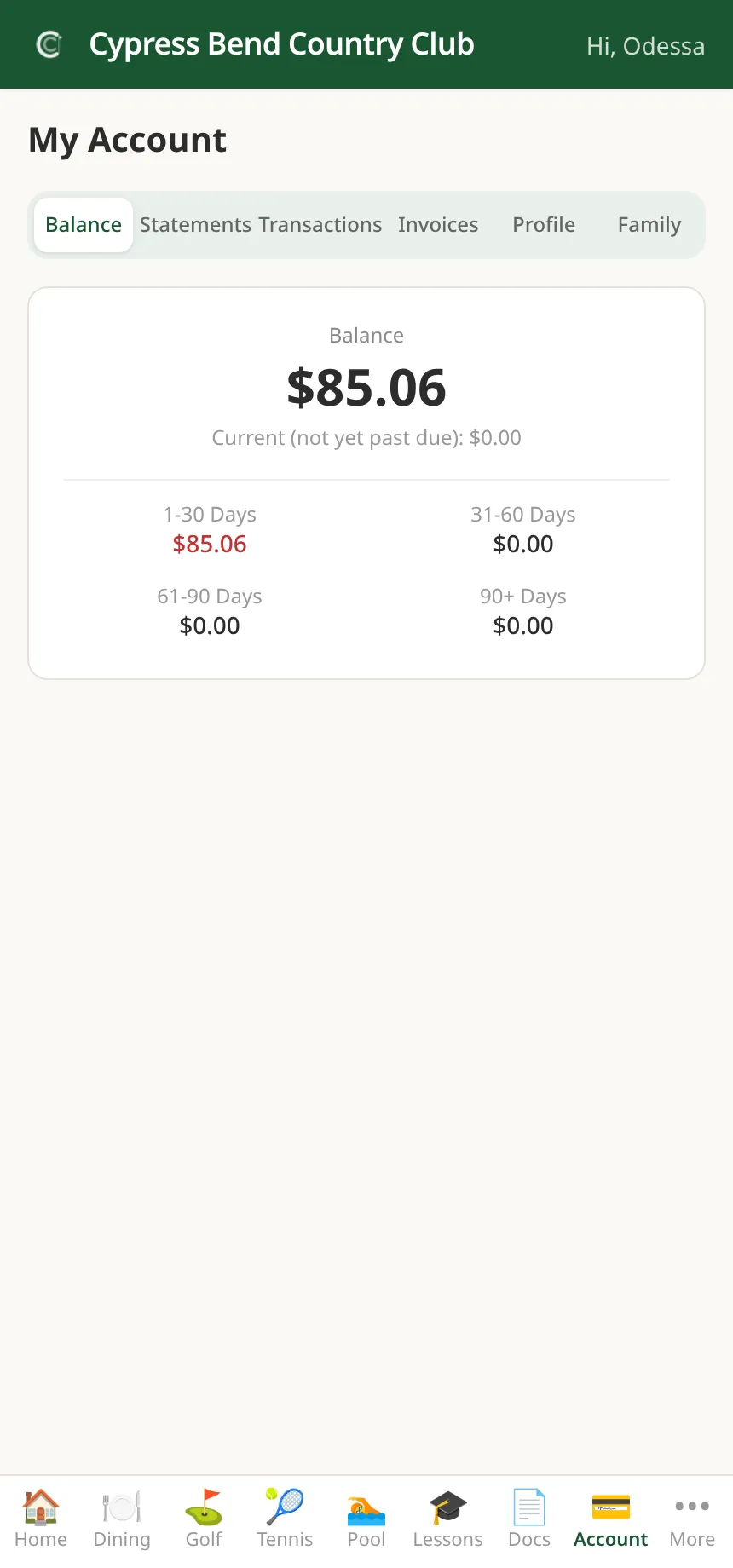
Members see the same numbers you do. The portal shows each member their live balance and aging, their full categorized transaction history, and their invoices — so “what’s this charge?” calls answer themselves before they reach the office.
Enroll a member once and their statement balance is drafted by ACH each cycle — no card-on-file fees, no chasing, no “the check’s in the mail.”
Staff enroll a member with their bank details and mandate acceptance; once the club is live on ACH, members can opt themselves in from the portal, and they can always turn it off there. Any enrollment can be paused, resumed or canceled at any time.
An autopay run charges every enrolled member with a statement balance via ACH. Trigger it on your schedule — the run works the whole enrollment list on its own.
Every charge lands in a permanent history with its status — succeeded, pending, failed, returned or skipped — so a member question is a lookup, not an investigation. Until Stripe ACH is live, runs are clearly marked simulated and move no money.
Card payments across ClubCore are processed through Stripe, on your club’s own Stripe account. Members pay their balance online from the portal by card, card-present payments at the point of sale run on Stripe Terminal readers, and clubs that want them can send members Stripe-hosted, card-payable invoices. ClubCore adds no per-transaction markup — your processing relationship is directly with Stripe.
Billing & A/R isn’t an add-on module with its own invoice — it ships with every ClubCore plan, on the same database as everything else. See plans.
We'll hand you a personal sandbox seeded with a full club — menu, members and three years of books — then walk your team through it.
Prefer email? [email protected] · ClubCore by Atlas Core Technologies, New Braunfels, Texas